
Day Three - Positioning Statement
Let's talk about context

It’s day three of our quest to build the infrastructure for the first solopreneunicorn. In the past two days, we built a tweet generator and a reply generator. Although I can already tell that my idea-to-tweet time (the X equivalent of the 40-yard dash) will dramatically improve by using these tools, there’s a key piece of infrastructure that still needs to be added: product context.
Did you notice how, when using the X post and X reply generator, I needed to provide background information about my product each time I generated new content? For example, when using the app in its current state, each time I ask the app to create new posts or replies about flyline, I need to re-explain what flyline is (example: by adding something like “flyline, a tool for querying data lakes from Excel” to my prompt).
Unnecessary, repetitive work is undoubtedly the enemy of a solopreneur or small team. We’re going to remove this repetitive work today by building a “Positioning statement” into our application. But first, let’s talk about the most common technique for giving context to large language models.
LLMs and context
Note: this post continues below today’s video!
“Context” is a word that gets tossed around a lot in the context (ugh!) of LLMs. Here’s a good article from IBM that expands on the idea, but the gist is that each individual language model can only accept a limited number of input words / partial words; this limit is referred to as the model’s “context window” (the words / partial words are more commonly referred to as “tokens”). As an example, the model that we’ve been using behind the scenes so far in this series, GPT-4o-mini, has a context window (limit) of 128,000 tokens. As a very imperfect point of comparison, consider that the average book has ~60,000 words, and if we apply a factor of 1.3 tokens per word, that give us a total of 78,000 tokens in a book).
In short, we have lots of room for background info in our model prompts!
Large language models do not remember things. Each call to an LLM is a blank slate. The technique most commonly used to synthetically create “memory” for these language models is simply to feed appropriate background information into the aptly named context window, essentially prefixing it to whatever a user is asking for. There are other techniques for influencing results, such as fine-tuning and agentic workflows, but for today, we’re just going to stick to the approach of prefixing our requests for content with relevant background information.
Product positioning template
Because our goal is to equip the model that generates our content with background information, we need to come up with a simple, elegant solution for creating background info about the product in the first place.
My first thought was to build a product positioning template similar to the Y Combinator application (note: it’s different now from the linked example), but it’s a bit too in-depth for what we need at this point (not to mention that a less wordy template will result in lower costs of using the OpenAI API in the long run).
After some searching, I found the following product positioning template from marketing guru Geoffrey Moore’s book, Crossing the Chasm:
For (target customer) who (statement of the need or opportunity), the (product name) is a (product category) that (statement of key benefit - that is, compelling reason to buy). Unlike (primary competitive alternative), our product (statement of primary differentiation).
All that we had to do was break this into separate form fields that we can fill out in our app, like so:
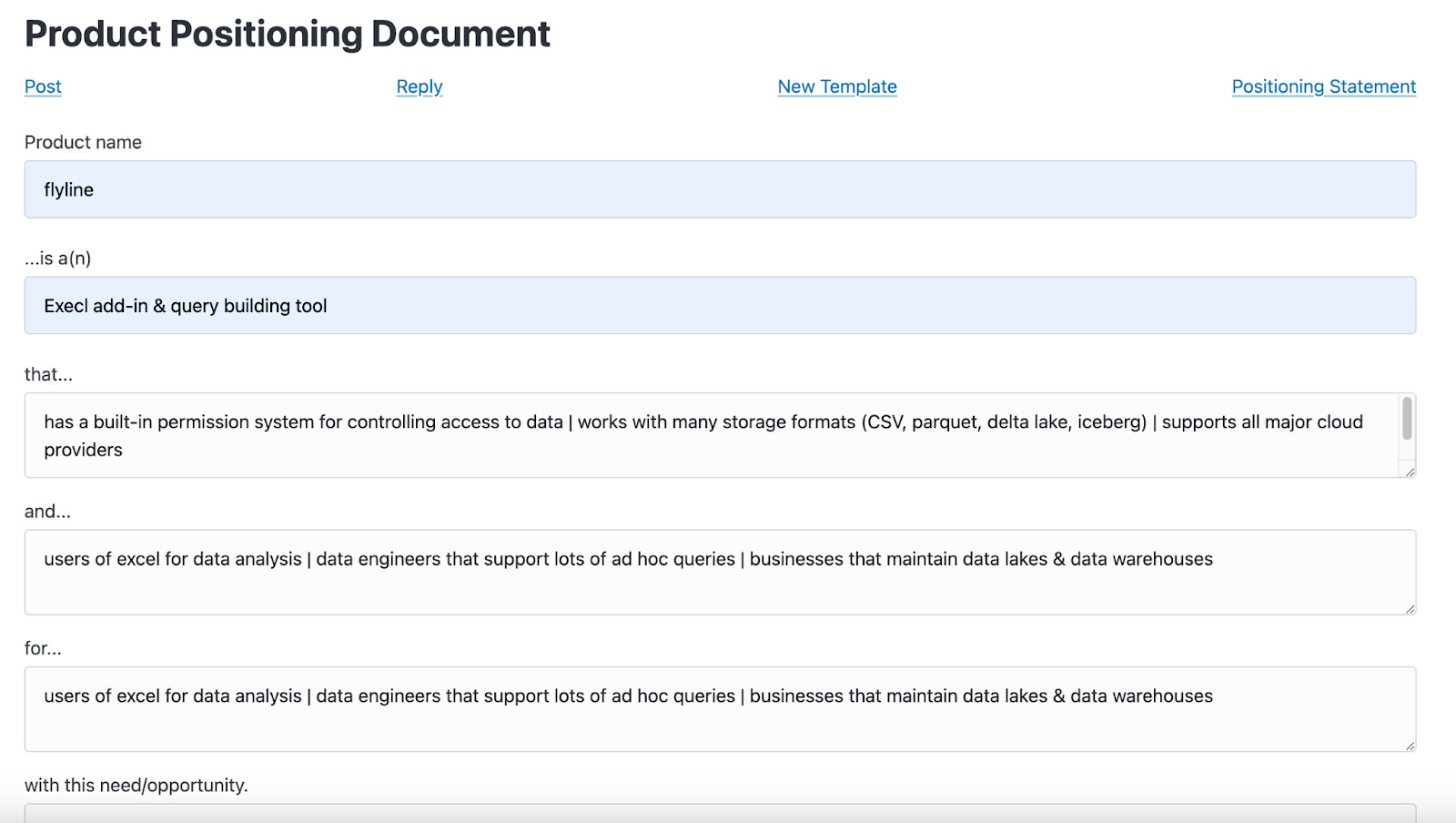
Once filled out, the information gets saved for use by the rest of the application. From here, we modified the tweet generation and reply functions, so that they always contain the information from our positioning document in their prompts (the context).
Now, we don’t need to fill out any repeat info, and can generate content with simpler instructions, like what you can see below:
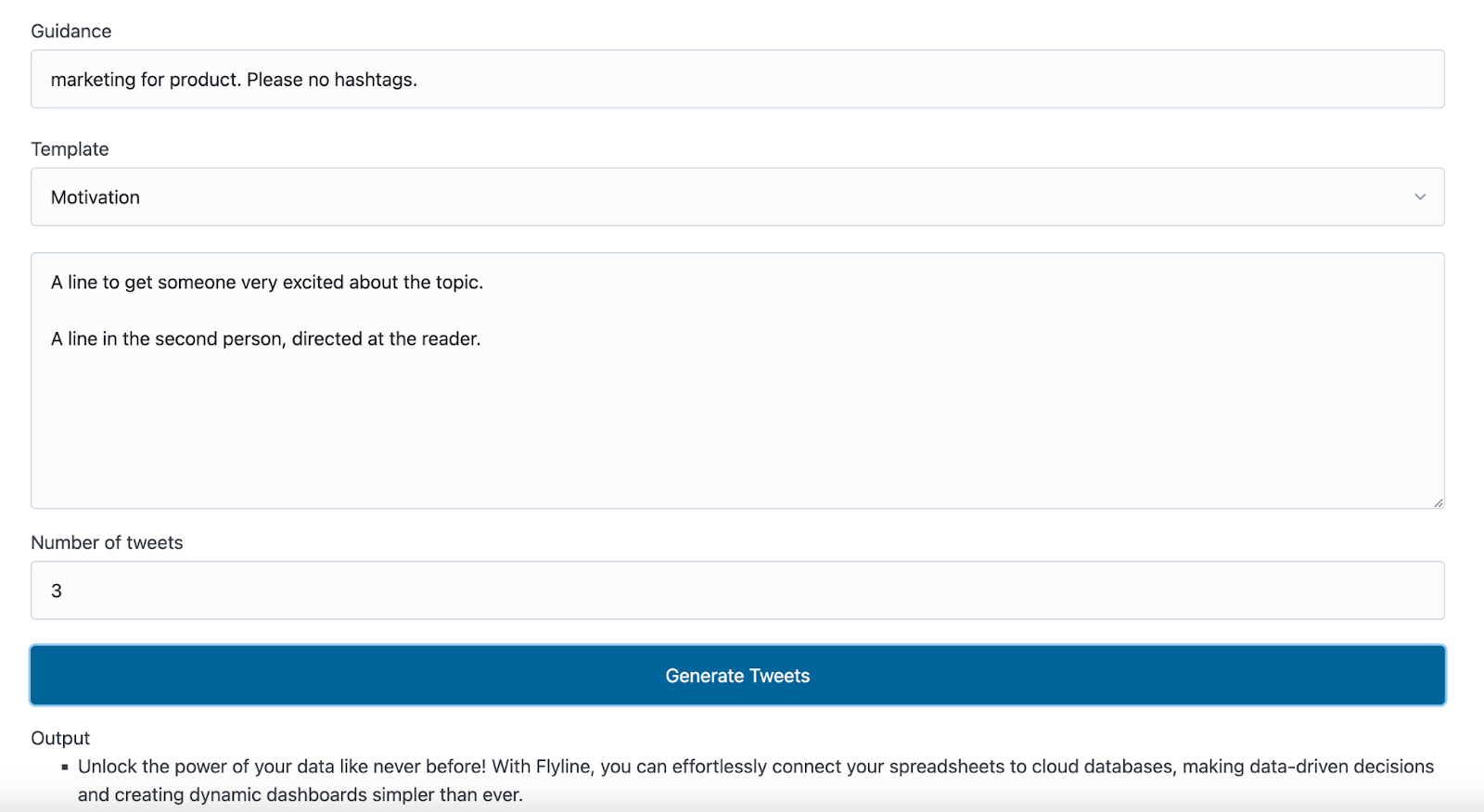
As usual, there is more work to be done, but these are promising results.
See you next time!